
Sawitara Mill
Weighbridge and grading, daily processing reports with OER/KER, tank sounding, losses and POME, maintenance, third-party FFB purchasing, and CPO/PK sales through to receivables.
What Mill fixes
Weights typed by hand
Operators type the indicator reading, so typos or altered figures are hard to prove.
Grading deductions disputed
Screen, minutes and ticket calculate deductions differently, and suppliers ask which figure is right.
Extraction rates that drift
Period OER is averaged from shift percentages instead of total CPO over total FFB.
Stock and contracts in spreadsheets
Tank stock, contracts, shipments and receivables live apart from FFB intake data.
What exists today, and what comes next
Status is stated honestly against the application code.
- Available in the code today and tested
- Preview partly available, with limits stated
- Coming soon planned or in development, not available yet
- AvailableWeighbridge
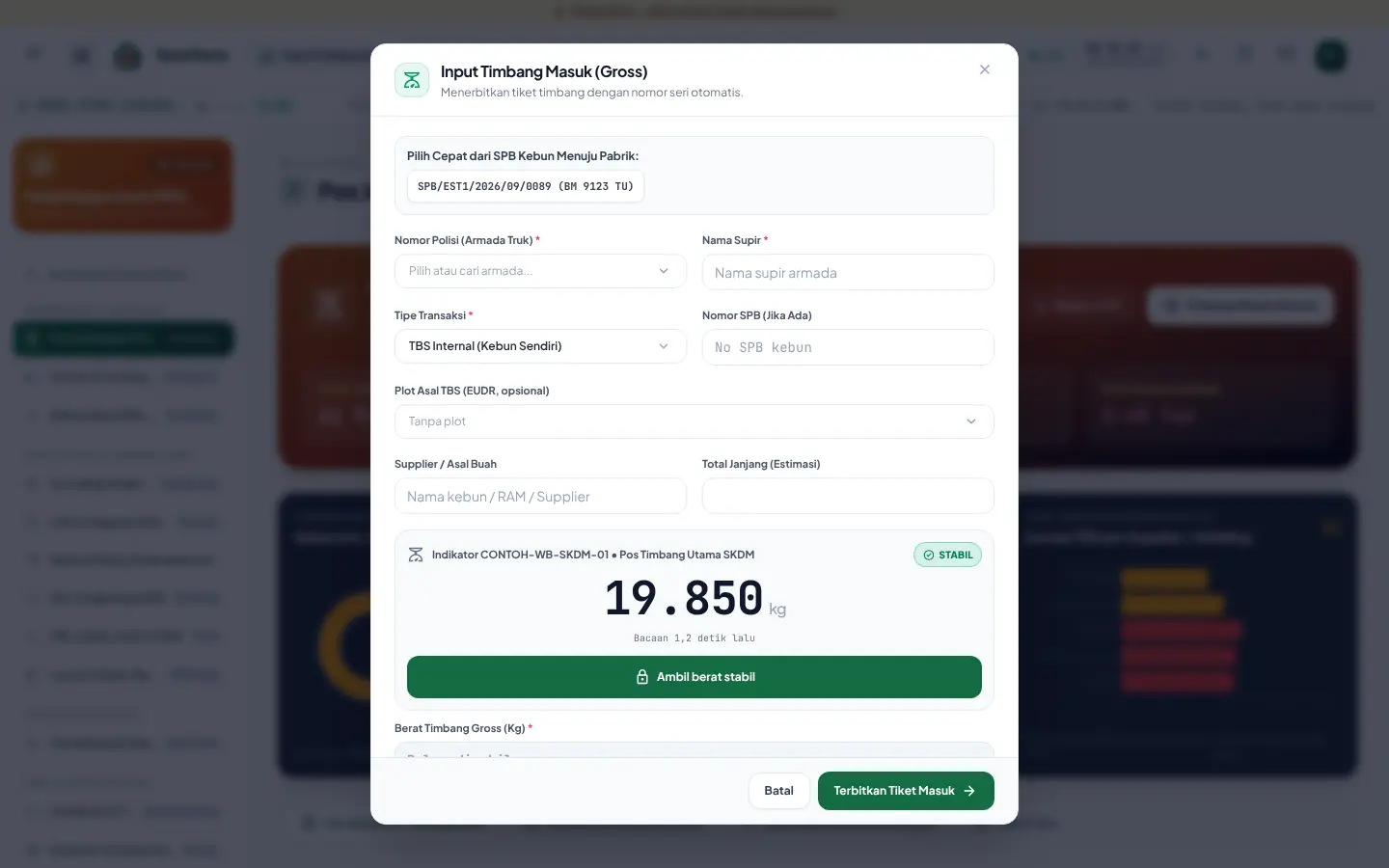
Gross and tare weighing, quick pick from estate dispatch notes, printed tickets; corrections and cancellations need a reason and approval and are logged in the ticket history.
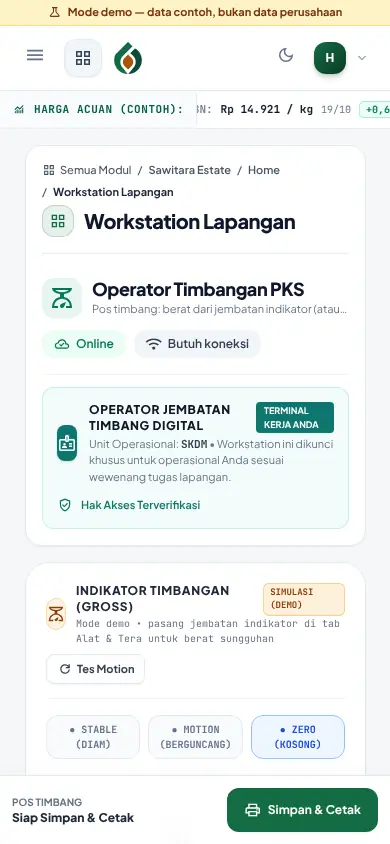
- AvailableWeighbridge operator workstation
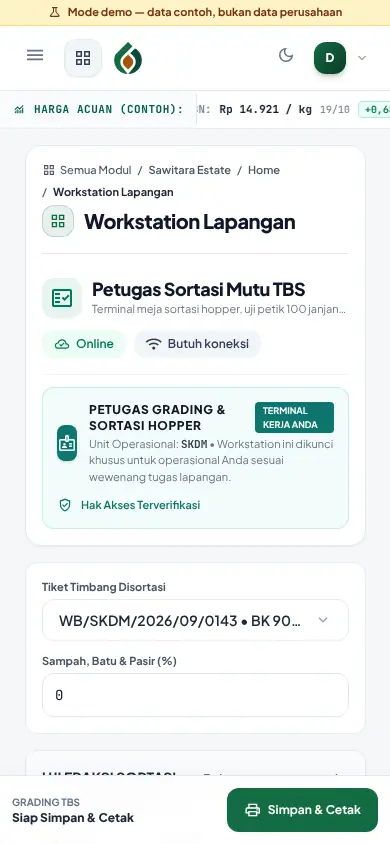
The operator work screen on the weighbridge PC and on a phone: issues the ticket (gross on entry, tare on exit), net weight, grading deductions, normal weight and actual bunch weight, with estate dispatch notes picked quickly and the ticket printed.
- AvailableTicket correction and cancellation
The weight of a completed ticket is corrected, or the ticket cancelled, only by a mill approver with a reason. Net weight, deductions and bunch weight are recalculated, old and new values are logged in the ticket history, a corrected weight is marked MANUAL and the dispatch note is reconciled again. A ticket already used by an FFB purchase slip cannot be corrected until that purchase is cancelled.
- AvailableOutbound weighing of CPO, kernel and shell
Tanker trucks and by-product trucks leaving the mill are weighed (empty tare, then loaded gross). CPO and kernel tickets must carry a shipping DO; at the second weighing product stock drops by the net weight, cost of goods sold is journalised and the DO loading total grows.
- AvailableWeight source recorded
INDICATOR or MANUAL is printed on the ticket; manual weights need a reason and can be restricted to approvers.
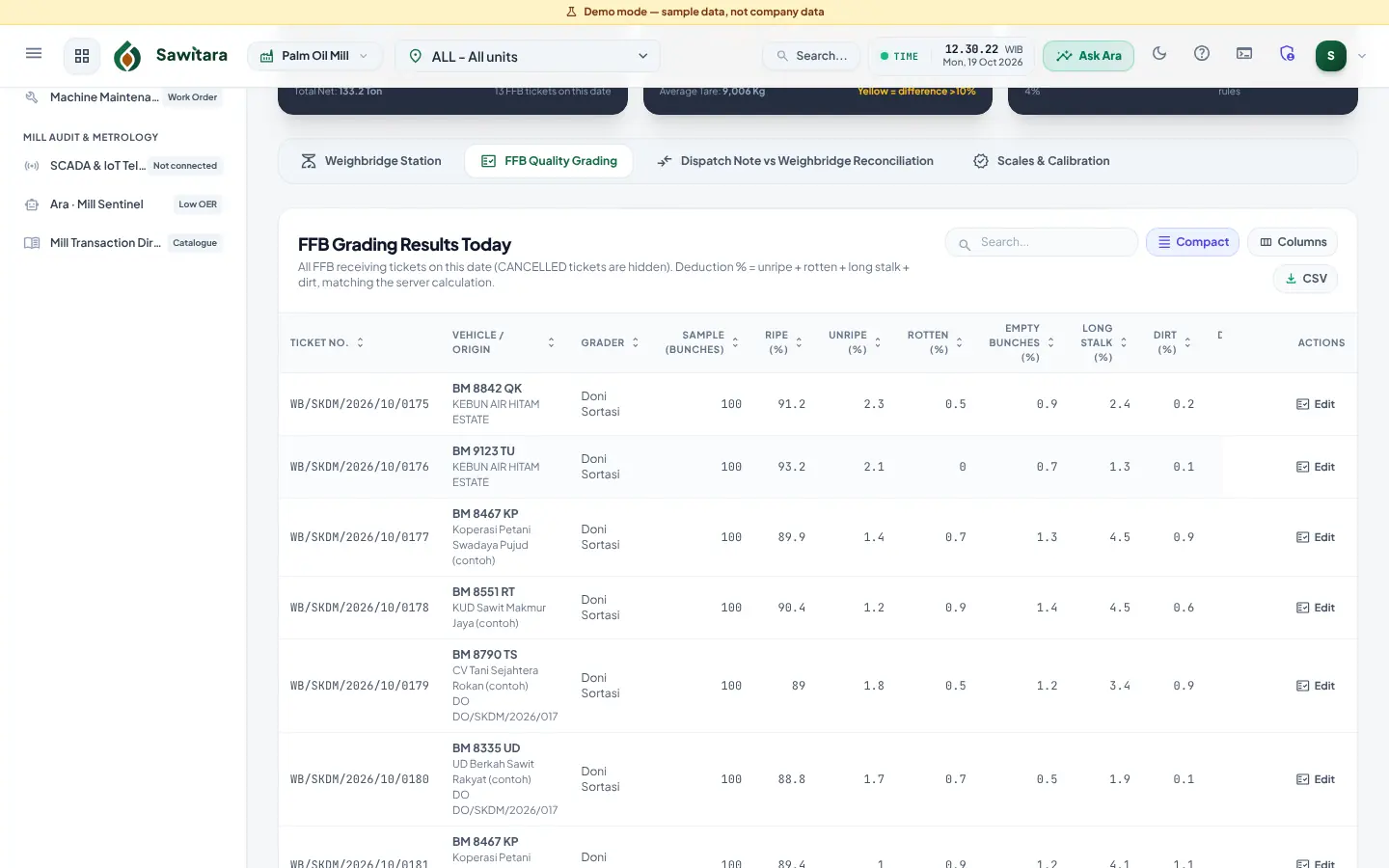
- AvailableWeighted grading, one formula
Deductions use the same formula on screen, minutes, ticket and server; weights and caps are set per mill.
- AvailableDispatch note vs net weight reconciliation
Transit shrinkage above tolerance is flagged as an anomaly.
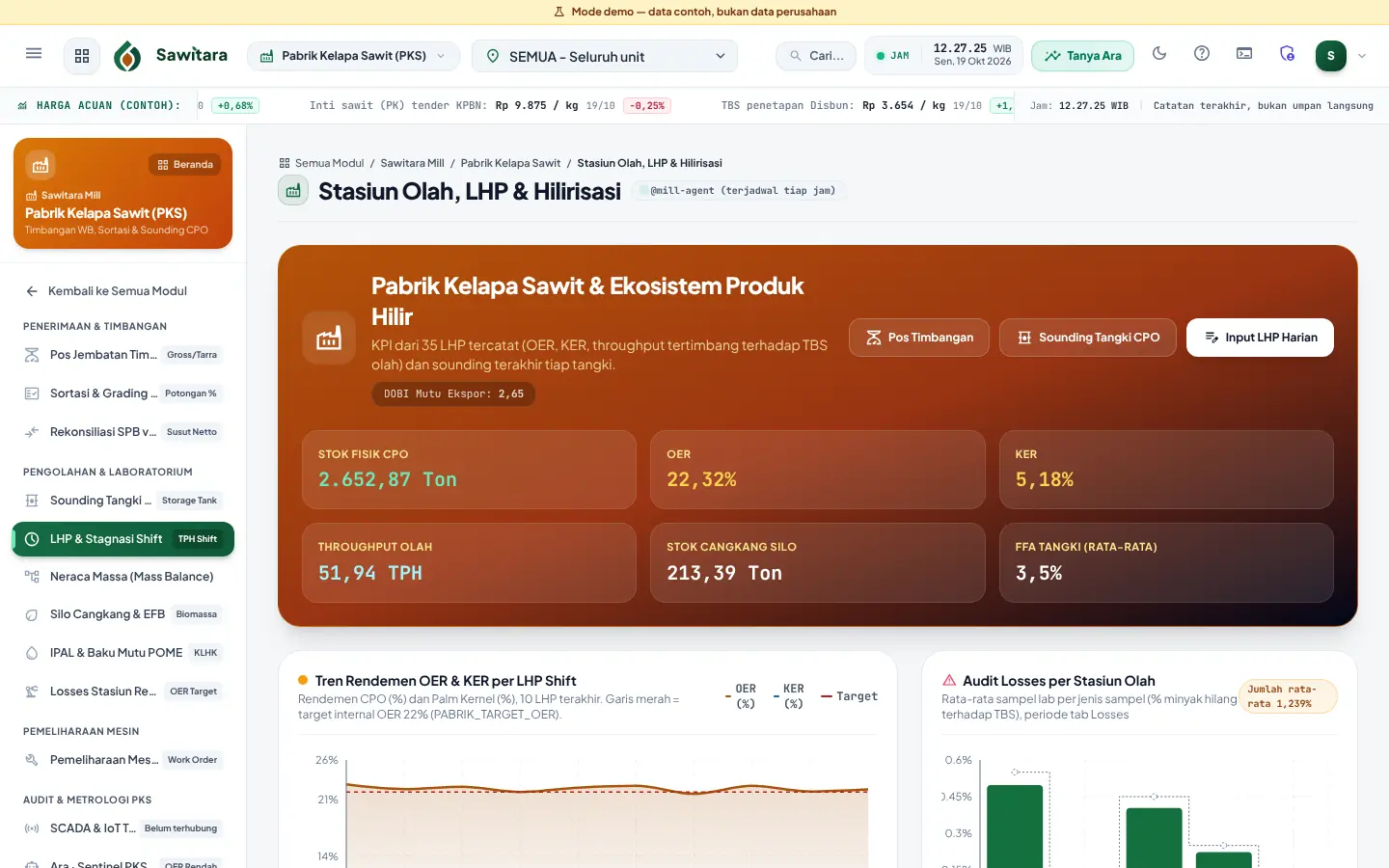
- AvailableDaily processing report, OER and KER
Per shift with throughput and downtime; period OER and KER come from totals, not averaged percentages.
- AvailableStorage tank sounding
Net stock from calibration tables and temperature correction, with quality (FFA, moisture, dirt, DOBI).
- AvailableProduct inventory and cost of goods sold (CPO, kernel, shell)
CPO and kernel stock grows from daily reports and drops on outbound tickets, valued at a weighted average per mill and commodity. Daily reports are journalised into inventory at the standard cost you set (empty means book stock only), cost of goods sold is journalised when product leaves, and sounding adjustments are journalised as inventory differences.
- AvailableLosses, mill mass balance, POME, biomass
Oil loss samples per station against internal targets, a mass balance separating measured from estimated figures, POME against discharge limits, shell and EFB stock.
- AvailableMachine maintenance
Equipment, preventive schedules, running hours, work orders and spare parts.
- AvailableThird-party FFB purchasing
Plasma smallholders and cooperatives (recorded Disbun price, profit-sharing slips, deductions), third-party purchases and ramp cashier with PPh 22.
- AvailableReference price on purchase slips
Third-party FFB purchase slips use the daily buying price the mill announced for the ticket date and palm age; a different price needs an Admin/Manager and a reason, is printed on the slip and summarised in a monthly Price Compliance card per officer.
- AvailableQuality bonus prices per grade
The mill sets a bonus or penalty table per grade and grading criterion (IDR/kg or percent of price) per period. The bonus is calculated automatically from the ticket's grading result, shown separately on the slip and included in the PPh 22 base. With the compliance parameter on, a penalty that takes the price below the Disbun reference price is rejected.
- AvailableFruit quality deductions at the ramp
A purchase slip is made from a completed ticket: the value comes from the paid weight after grading quality deductions, plus quality and supply programme bonuses, then PPh 22 is withheld from the gross value after bonuses, and any Toko Input deduction is shown on the slip before payment.
- AvailableSupply target and bonus programmes
Mill-owned programmes for all suppliers, a supplier group, cooperative members, DO holders or chosen suppliers: tonnage and quality targets, per-kg or fixed bonus, budget cap. Calculated from official tickets, closed and approved by staff with an incentive expense journal, then paid on the next purchase slip. Effectiveness report and cost per tonne. No redeemable points and no lottery.
- AvailableDO holders and quotas
DO holder master per mill with number, validity and monthly quota; outside FFB tickets are linked to a DO at weigh-in with a warning or rejection when the quota is used up; tonnage, deductions, purchase value, PPh 22 and payments per DO with a breakdown per supplier.
- AvailableCPO/PK sales to receivables
Contracts, shipping DOs, lab results, quality claims, invoices, payments, receivable ageing and adjustment notes; reference prices recorded with source and evidence.
- PreviewWeighing indicator agent
A small agent on the weighbridge PC (Windows/Linux) reads the indicator over RS-232/USB-serial or TCP and sends weights over HTTPS; the server only accepts a weight equal to the last stable reading. Frame profiles are not yet tested on a real indicator.
- Coming soonSawitara Mill – Weighbridge as a separate module
Today the weighbridge is enabled with the full mill module; a stand-alone weighbridge module is planned.
- Coming soonSCADA/IoT integration (simulation only)
The SCADA screen in the app only holds the integration design and a signed-webhook simulator. There is no gateway or real machine data from the mill yet; do not read it as a working integration.
- Coming soonAgent pre-registration of dispatch notes
Agents register a dispatch note before the truck arrives so the weighbridge ticket fills in faster. Not yet available; today digital haul slips are created by drivers or transporters.
Honest note: Indicator frame profiles are based on common output formats and have not been tested on a real indicator; each indicator must be matched using the agent dry-run mode. Scales without the agent are entered manually with a reason.
Screenshots and video tutorials
Videos are screen recordings of the app with demo data and Indonesian narration.
-
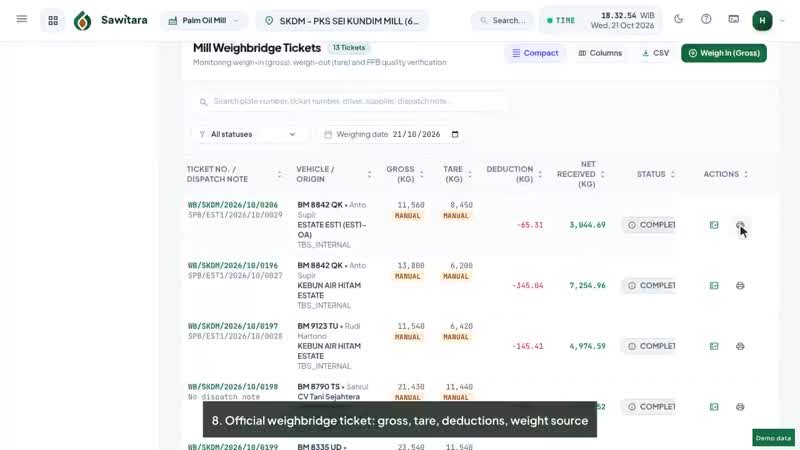 1:15Sawitara MillPalm Oil MillWeighbridge, FFB grading, tickets and daily mill report
- The operator opens the Weighbridge Station
- Simulation mode: indicator readings are not sent to the ticket
- Weigh in: choose the estate's SPB, truck details fill in
-
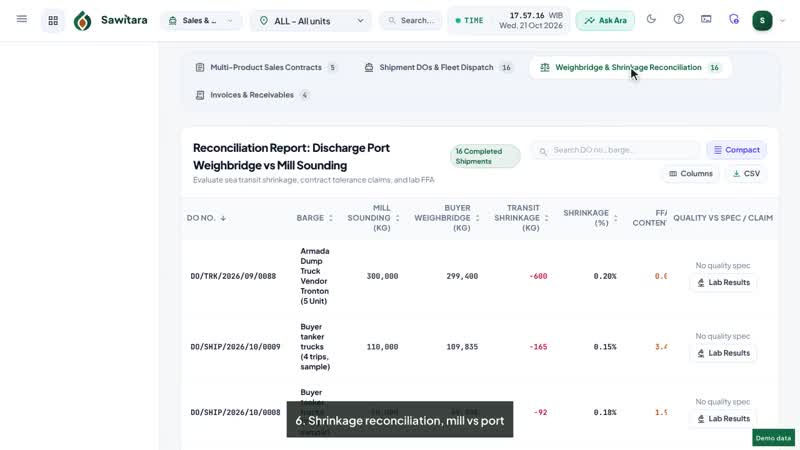 1:20Sawitara MillSales & MarketingMarket prices, sales contracts and shipping DOs
- Market prices: KPBN, Disbun and exchange rates recorded with their source
- Sales contracts for CPO, kernel, shells and empty bunches
- Quality terms: FFA, moisture and dirt, and price deductions
-
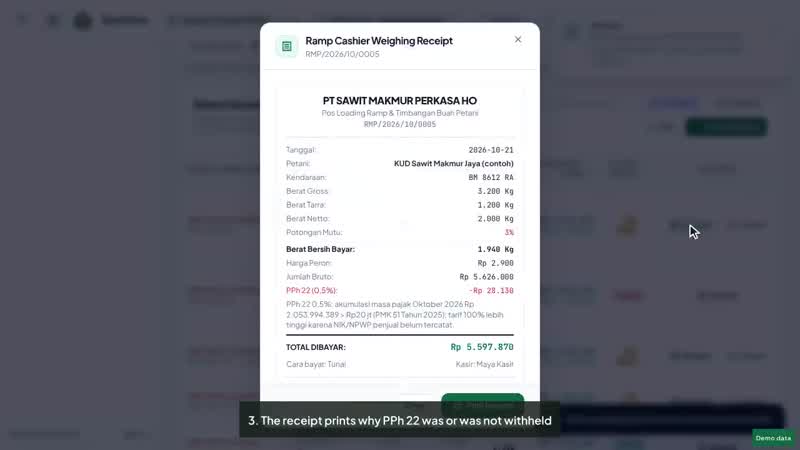 1:04Sawitara MillRamp & Collection PointFFB purchase receipts, PPh 22 reasons, receipt cancellation and truck dispatch
- The ramp cashier weighs growers' FFB
- Grading deduction and price: amount payable calculated
- The receipt prints why PPh 22 was or was not withheld
Who uses it
- Mill managers and assistants
- Weighbridge operators and graders
- Lab and sounding analysts
- Sales and FFB purchasing teams
Connected to other products
- Sawitara EstateReceives estate dispatch notes at the weighbridge without retyping.
- Tandan by SawitaraTickets, grading deductions and payments appear in the grower and supplier portal.
- Sawitara FinanceFFB purchases become payables and sales become receivables, all journalised.
- Sawitara TraceWeighbridge tickets are linked to plots of origin for traceability to plantation.
- AraSentinels check OER below threshold and transit shrinkage.
Quick answers
Is the weighbridge connected directly to the indicator?
Yes, through the weighbridge agent on the weighbridge PC. Frame profiles have not been tested on a real indicator, so each indicator is matched first in dry-run mode. Scales without the agent are entered manually with a reason.
Can grading weights differ per mill?
Yes. Criterion weights and the total deduction cap are set in Business Parameters, globally or per mill.
How is period OER calculated?
From total CPO divided by total FFB processed in the period, not the average of shift percentages.
See Mill with demo data
We walk you through the flow in 15 minutes and answer your team’s questions.